





Mobile Printing
Print directly from your mobile device while in the library or send your print job from home using a laptop or computer. You may pay with credit/debit card, Apple Pay, Google Wallet or cash. Black & white single-sided printouts cost 15¢ each. Color single-sided printouts cost 50¢ each. If you are paying in cash, please note that the Change Machine will not take anything higher than a $5 bill.
Printing From Your Mobile Device in the Library
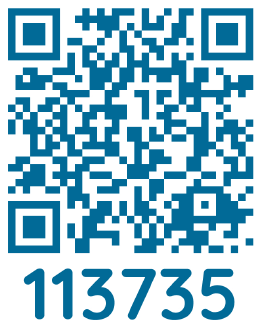
Use the QR Code below to print from your mobile device at the Printing kiosk:
Print Remotely from Home Using a Laptop or Computer:
Go to Mobile Printing to upload your document. You may pay online with credit/debit, Apple Pay and Google Wallet before your library visit or pay with cash at the kiosk. After submitting the print job, you will be provided with a 4-digit print release code. Visit the print kiosk in the library and enter your 4-digit code to release your job.
To Print an Email or an Email Attachment:
Forward or send the email to the printer's email address. This will print both the body of the email and the attachment. Click on the Gear icon at the end of the job to remove the original email.
How to Print Videos
Printing from a mobile phone or tablet
Printing from a laptop or PC
Printing with the Princh Mobile App on iOS
Printing with the Princh Mobile App on Android